Star ratings are a quick and simple way to get feedback from your users, that’s why it has become so popular all around the web. Today we’ll extend WordPress comments by adding our own star rating system.
The main plugin file
Let’s create the main file that will contain most of our plugin’s code. Using an FTP client navigate to /wp-content/plugins/ in your WordPress installation and create a folder called ci-comment-rating (or anything else you prefer). Next enter the folder and create a file called ci-comment-rating.php (again, naming is up to you).
Edit the file and paste in a header similar to the one below:
<?php
/*
Plugin Name: CI Comment Rating
Description: Adds a star rating system to WordPress comments
Version: 1.0.0
Author: The CSSIgniter Team
Author URI: https://cssigniter.com/
*/
Creating the rating interface.
First we will need to create the interface which the visitor uses to rate our post. To do that paste the code below in the plugin’s file.
//Create the rating interface.
add_action( 'comment_form_logged_in_after', 'ci_comment_rating_rating_field' );
add_action( 'comment_form_after_fields', 'ci_comment_rating_rating_field' );
function ci_comment_rating_rating_field () {
    ?>
    <label for="rating">Rating<span class="required">*</span></label>
    <fieldset class="comments-rating">
        <span class="rating-container">
            <?php for ( $i = 5; $i >= 1; $i-- ) : ?>
                <input type="radio" id="rating-<?php echo esc_attr( $i ); ?>" name="rating" value="<?php echo esc_attr( $i ); ?>" /><label for="rating-<?php echo esc_attr( $i ); ?>"><?php echo esc_html( $i ); ?></label>
            <?php endfor; ?>
            <input type="radio" id="rating-0" class="star-cb-clear" name="rating" value="0" /><label for="rating-0">0</label>
        </span>
    </fieldset>
    <?php
}
The code above will take care of placing the rating system in the comment form, for both logged in and logged out users. This is what you it will look like after you add the code:
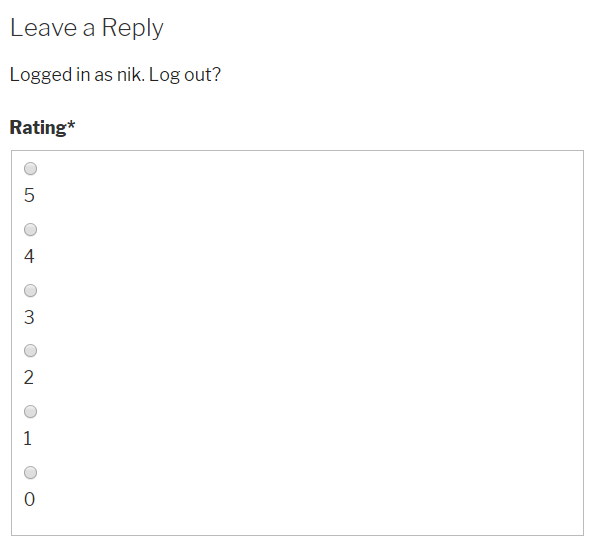
Not very pretty, right? Let’s fix that.
Adding some styling
We will need some stars, after all it’s a star rating system, so we will need to enqueue dashicons on the frontend as well. Along with that we will need to create an assets folder in the plugin’s main folder and inside it create a style.css file. Edit the style.css file and paste in the code below.
.comments-rating {
    border: none;
    padding: 0;
    margin-left: 0;
}

.comments-rating label {
    display: inline-block;
}

.rating-container {
    font-size: 0;
    display: flex;
    justify-content: flex-end;
    flex-direction: row-reverse;
}

.rating-container * {
    font-size: 1.4rem;
}

.rating-container > input {
    display: none;
}

.rating-container > input + label {
    /* only enough room for the star */
    font-family: 'dashicons';
    display: inline-block;
    overflow: hidden;
    text-indent: 9999px;
    width: 1em;
    white-space: nowrap;
    cursor: pointer;
    margin: 0;
}

.rating-container > input + label:before {
    display: inline-block;
    text-indent: -9999px;
    content: "\f154";
    color: #888;
}

.rating-container > input:checked ~ label:before,
.rating-container > input + label:hover ~ label:before,
.rating-container > input + label:hover:before {
    content: "\f155";
    color: #e52;
    text-shadow: 0 0 1px #333;
}

.rating-container > .star-cb-clear + label {
    text-indent: -9999px;
    width: .5em;
    margin-left: -.5em;
}

.rating-container > .star-cb-clear + label:before {
    width: .5em;
}

.rating-container:hover > input + label:before {
    content: "\f154";
    color: #888;
    text-shadow: none;
}

.rating-container:hover > input + label:hover ~ label:before,
.rating-container:hover > input + label:hover:before {
    content: "\f155";
    color: #e52;
    text-shadow: 0 0 1px #333;
}

.comment-respond .rating-container > .star-cb-clear + label, .comment-respond .rating-container > input + label:before {
    text-indent: 9999px;
}

.comment-respond .rating-container > input + label {
    text-indent: -9999px;
}
Next go back to the ci-comment-rating.php file and paste this in:
//Enqueue the plugin's styles.
add_action( 'wp_enqueue_scripts', 'ci_comment_rating_styles' );
function ci_comment_rating_styles() {

    wp_register_style( 'ci-comment-rating-styles', plugins_url( '/', __FILE__ ) . 'assets/style.css' );

    wp_enqueue_style( 'dashicons' );
    wp_enqueue_style( 'ci-comment-rating-styles' );
}
We start by registering the style.css file we created earlier, then we enqueue both the dashicons and the stylesheet. Now let’s save and refresh the page.
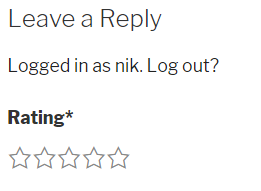
Ah, much better!
Saving the user’s input
We have successfully created the interface the user can use to rate our post, next we need to make sure the rating is stored in our database. To do that we will use add_comment_meta to create a custom field in the comments which will store our rating data. Paste the code below in the plugin’s main file.
//Save the rating submitted by the user.
add_action( 'comment_post', 'ci_comment_rating_save_comment_rating' );
function ci_comment_rating_save_comment_rating( $comment_id ) {
    if ( ( isset( $_POST['rating'] ) ) && ( '' !== $_POST['rating'] ) )
    $rating = intval( $_POST['rating'] );
    add_comment_meta( $comment_id, 'rating', $rating );
}
In the code above we hook into comment_post which fires exactly after a comment is submitted. We check to see if the user added a rating, sanitize it, and store it in the database.
Making the rating required (optional)
If you want to have the users always submit a rating along with their comments you can paste this in the plugin’s main file.
//Make the rating required.
add_filter( 'preprocess_comment', 'ci_comment_rating_require_rating' );
function ci_comment_rating_require_rating( $commentdata ) {
    if ( ! is_admin() && ( ! isset( $_POST['rating'] ) || 0 === intval( $_POST['rating'] ) ) )
    wp_die( __( 'Error: You did not add a rating. Hit the Back button on your Web browser and resubmit your comment with a rating.' ) );
    return $commentdata;
}
Here we check if there is a rating in the submitted comment’s data, and if not we output an error prompting the user to go back and resubmit along with a rating. This is of course optional.
TIP: if you don’t want to make the rating required consider removing the
<span class="required">*</span>
bit from the rating interface above. This will remove the visual cue that rating is required.
Display the rating on a submitted comment
Once a user has rated our post we should display that rating along with their comment. To do that paste the code below in the plugin’s main file.
//Display the rating on a submitted comment.
add_filter( 'comment_text', 'ci_comment_rating_display_rating');
function ci_comment_rating_display_rating( $comment_text ){

    if ( $rating = get_comment_meta( get_comment_ID(), 'rating', true ) ) {
        $stars = '<p class="stars">';
        for ( $i = 1; $i <= $rating; $i++ ) {
            $stars .= '<span class="dashicons dashicons-star-filled"></span>';
        }
        $stars .= '</p>';
        $comment_text = $comment_text . $stars;
        return $comment_text;
    } else {
        return $comment_text;
    }
}
What we do here, is hook into comment_text, check if there is an actual rating on the post, if there is we generate some markup that will display it and return it along the comment’s text. If there is no rating we just return the comment’s text.
Job done!
That’s pretty much it, we have created a simple plugin that will add a star rating system on WordPress comments.
Extending the plugin
Now that you have the data, you can utilize it in any way you wish by extending the plugin a bit. For example let’s get a post’s average rating and display it above the content.
In the plugin’s main file paste this in.
//Get the average rating of a post.
function ci_comment_rating_get_average_ratings( $id ) {
    $comments = get_approved_comments( $id );

    if ( $comments ) {
        $i = 0;
        $total = 0;
        foreach( $comments as $comment ){
            $rate = get_comment_meta( $comment->comment_ID, 'rating', true );
            if( isset( $rate ) && '' !== $rate ) {
                $i++;
                $total += $rate;
            }
        }

        if ( 0 === $i ) {
            return false;
        } else {
            return round( $total / $i, 1 );
        }
    } else {
        return false;
    }
}
This function will get the ID of a post, run through all of the approved comments, sum up the existing ratings and return the average rounded up to the first decimal. If there are no ratings on the tested post it will return false.
To display the average comment rating above the post’s content we can use this code:
//Display the average rating above the content.
add_filter( 'the_content', 'ci_comment_rating_display_average_rating' );
function ci_comment_rating_display_average_rating( $content ) {

    global $post;

    if ( false === ci_comment_rating_get_average_ratings( $post->ID ) ) {
        return $content;
    }

    $stars   = '';
    $average = ci_comment_rating_get_average_ratings( $post->ID );

    for ( $i = 1; $i <= $average + 1; $i++ ) {

        $width = intval( $i - $average > 0 ? 20 - ( ( $i - $average ) * 20 ) : 20 );

        if ( 0 === $width ) {
            continue;
        }

        $stars .= '<span style="overflow:hidden; width:' . $width . 'px" class="dashicons dashicons-star-filled"></span>';

        if ( $i - $average > 0 ) {
            $stars .= '<span style="overflow:hidden; position:relative; left:-' . $width .'px;" class="dashicons dashicons-star-empty"></span>';
        }
    }

    $custom_content  = '<p class="average-rating">This post\'s average rating is: ' . $average .' ' . $stars .'</p>';
    $custom_content .= $content;
    return $custom_content;
}
The code above will try to get the average rating using the function we created on the previous step, if it doesn’t get anything it will just return the content, otherwise it will place a paragraph, just above the post’s content, displaying the average post rating.

Wrapping up
That’s all for this tutorial, we hope you found it useful and if you come up with interesting ideas of extending the plugin and using the gathered data, please let us know in the comments below!
The complete plugin file
Below you will find the entire ci-comment-rating.php file which you can copy/paste into your plugin folder.
<?php
/*
Plugin Name: CI Comment Rating
Description: Adds a star rating system to WordPress comments
Version: 1.0.0
Author: The CSSIgniter Team
Author URI: https://cssigniter.com/
*/

//Enqueue the plugin's styles.
add_action( 'wp_enqueue_scripts', 'ci_comment_rating_styles' );
function ci_comment_rating_styles() {

    wp_register_style( 'ci-comment-rating-styles', plugins_url( '/', __FILE__ ) . 'assets/style.css' );

    wp_enqueue_style( 'dashicons' );
    wp_enqueue_style( 'ci-comment-rating-styles' );
}

//Create the rating interface.
add_action( 'comment_form_logged_in_after', 'ci_comment_rating_rating_field' );
add_action( 'comment_form_after_fields', 'ci_comment_rating_rating_field' );
function ci_comment_rating_rating_field () {
    ?>
    <label for="rating">Rating<span class="required">*</span></label>
    <fieldset class="comments-rating">
        <span class="rating-container">
            <?php for ( $i = 5; $i >= 1; $i-- ) : ?>
                <input type="radio" id="rating-<?php echo esc_attr( $i ); ?>" name="rating" value="<?php echo esc_attr( $i ); ?>" /><label for="rating-<?php echo esc_attr( $i ); ?>"><?php echo esc_html( $i ); ?></label>
            <?php endfor; ?>
            <input type="radio" id="rating-0" class="star-cb-clear" name="rating" value="0" /><label for="rating-0">0</label>
        </span>
    </fieldset>
    <?php
}

//Save the rating submitted by the user.
add_action( 'comment_post', 'ci_comment_rating_save_comment_rating' );
function ci_comment_rating_save_comment_rating( $comment_id ) {
    if ( ( isset( $_POST['rating'] ) ) && ( '' !== $_POST['rating'] ) )
    $rating = intval( $_POST['rating'] );
    add_comment_meta( $comment_id, 'rating', $rating );
}

//Make the rating required.
add_filter( 'preprocess_comment', 'ci_comment_rating_require_rating' );
function ci_comment_rating_require_rating( $commentdata ) {
    if ( ! is_admin() && ( ! isset( $_POST['rating'] ) || 0 === intval( $_POST['rating'] ) ) )
    wp_die( __( 'Error: You did not add a rating. Hit the Back button on your Web browser and resubmit your comment with a rating.' ) );
    return $commentdata;
}

//Display the rating on a submitted comment.
add_filter( 'comment_text', 'ci_comment_rating_display_rating');
function ci_comment_rating_display_rating( $comment_text ){

    if ( $rating = get_comment_meta( get_comment_ID(), 'rating', true ) ) {
        $stars = '<p class="stars">';
        for ( $i = 1; $i <= $rating; $i++ ) {
            $stars .= '<span class="dashicons dashicons-star-filled"></span>';
        }
        $stars .= '</p>';
        $comment_text = $comment_text . $stars;
        return $comment_text;
    } else {
        return $comment_text;
    }
}

//Get the average rating of a post.
function ci_comment_rating_get_average_ratings( $id ) {
    $comments = get_approved_comments( $id );

    if ( $comments ) {
        $i = 0;
        $total = 0;
        foreach( $comments as $comment ){
            $rate = get_comment_meta( $comment->comment_ID, 'rating', true );
            if( isset( $rate ) && '' !== $rate ) {
                $i++;
                $total += $rate;
            }
        }

        if ( 0 === $i ) {
            return false;
        } else {
            return round( $total / $i, 1 );
        }
    } else {
        return false;
    }
}

//Display the average rating above the content.
add_filter( 'the_content', 'ci_comment_rating_display_average_rating' );
function ci_comment_rating_display_average_rating( $content ) {

    global $post;

    if ( false === ci_comment_rating_get_average_ratings( $post->ID ) ) {
        return $content;
    }

    $stars   = '';
    $average = ci_comment_rating_get_average_ratings( $post->ID );

    for ( $i = 1; $i <= $average + 1; $i++ ) {

        $width = intval( $i - $average > 0 ? 20 - ( ( $i - $average ) * 20 ) : 20 );

        if ( 0 === $width ) {
            continue;
        }

        $stars .= '<span style="overflow:hidden; width:' . $width . 'px" class="dashicons dashicons-star-filled"></span>';

        if ( $i - $average > 0 ) {
            $stars .= '<span style="overflow:hidden; position:relative; left:-' . $width .'px;" class="dashicons dashicons-star-empty"></span>';
        }
    }

    $custom_content  = '<p class="average-rating">This post\'s average rating is: ' . $average .' ' . $stars .'</p>';
    $custom_content .= $content;
    return $custom_content;
}
Tags: code